

Introduction
On January 12, 2021, Microsoft released a security update for SQL Server 2012, SQL Server 2014, SQL Server 2016, SQL Server 2017, and SQL Server 2019. This Security Update is for SQL Server 2012 through 2019 (CVE-2021-1636).
I first noticed this when I saw Windows Update offering up a SQL Server 2019 Security update on my main workstation this morning. Remember, today is Patch Tuesday!

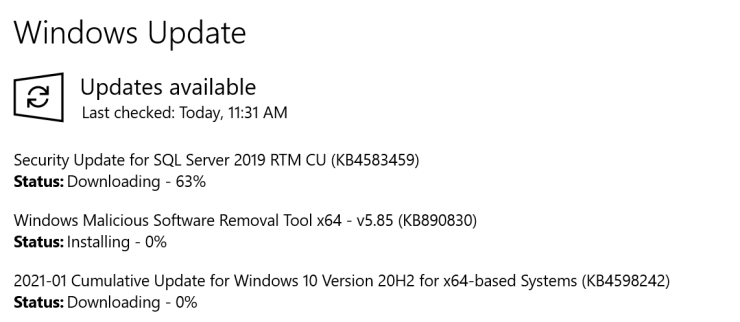
Depending on how your machine is configured, it might automatically download and install this update as part of the normal automated Patch Tuesday process. It also can happen if you manually check Windows Update. That is probably ok for a workstation, but is not something you want happening on a production SQL Server instance. It is much better to manually control when a SQL Server patch like this is installed on a production instance.
Just to be clear, installing this update is very similar to installing a regular SQL Server Cumulative Update. Whatever method is used to install it, the SQL Server service is going to stop and then be restarted. This will cause an outage for SQL Server, just like you would see when installing a SQL Server Cumulative Update. If you have an HA solution in place, there are ways to minimize the length of the outage.
KB4583468 – Microsoft SQL Server elevation of privilege vulnerability
In KB4583468, Microsoft describes the issue:
Data can be sent over a network to an affected Microsoft SQL Server instance that may cause code to run against the SQL Server process if a certain extended event is enabled. See CVE-2021-1636 for detailed information.
KB4583468 – Microsoft SQL Server elevation of privilege vulnerability
What Patch Do You Need?
Because of how Microsoft classifies SQL Server servicing branches, there are nine different patches for this issue. One for each supported branch. The GDR branch is for organizations that do not install SQL Server Cumulative Updates, while the CU branch is for organizations that do install cumulative updates. Only security updates go into the GDR branch, while CU branches get other bug fixes and feature enhancements.
These nine different patches are linked below. This link has a table that helps you determine which patch to apply based on your current SQL Server build number.
- KB4583458 – Description of the security update for SQL Server 2019 GDR: January 12, 2021
- KB4583459 – Description of the security update for SQL Server 2019 CU8: January 12, 2021
- KB4583456 – Description of the security update for SQL Server 2017 GDR: January 12, 2021
- KB4583457 – Description of the security update for SQL Server 2017 CU22: January 12, 2021
- KB4583460 – Description of the security update for SQL Server 2016 SP2 GDR: January 12, 2021
- KB4583461 – Description of the security update for SQL Server 2016 SP2 CU15: January 12, 2021
- KB4583463 – Description of the security update for SQL Server 2014 SP3 GDR: January 12, 2021
- KB4583465 – Description of the security update for SQL Server 2012 SP4 GDR: January 12, 2021
- KB4583462 – Description of the security update for SQL Server 2014 SP3 CU4: January 12, 2021
Keep in mind, if you are on a GDR branch, and you install a CU patch, you will then be on a CU branch. Also remember that these patches are only available for supported branches of SQL Server 2012 through SQL Server 2019.
What that means is that if you are still on the SQL Server 2016 SP1 or SQL Server 2016 RTM branches, there is no security patch for you, because those branches are no longer supported. You will have to install SQL Server 2016 SP2, and then install the appropriate security patch on top of that.
Both SQL Server 2014 and SQL Server 2012 are out of Mainstream Support, but they are still in Extended Support. That means they get security updates like this. You will also need to be on the latest Service Pack for those versions in order to get this security update.
Here is Microsoft’s current guidance about the Modern Servicing Model for SQL Server:
- Announcing the Modern Servicing Model for SQL Server
- Announcing Updates to the Modern Servicing Model for SQL Server
Final Words
I think you should try to deploy this update as soon as possible after you have been able to test it.
If you have any questions about this post, please ask me here in the comments or on Twitter. I am pretty active on Twitter as GlennAlanBerry. Thanks for reading!